Fehér Magic billentyűzet iPad-hez háttérvilágítással: Hosszú távú értékelés
Time : 2026-09-17
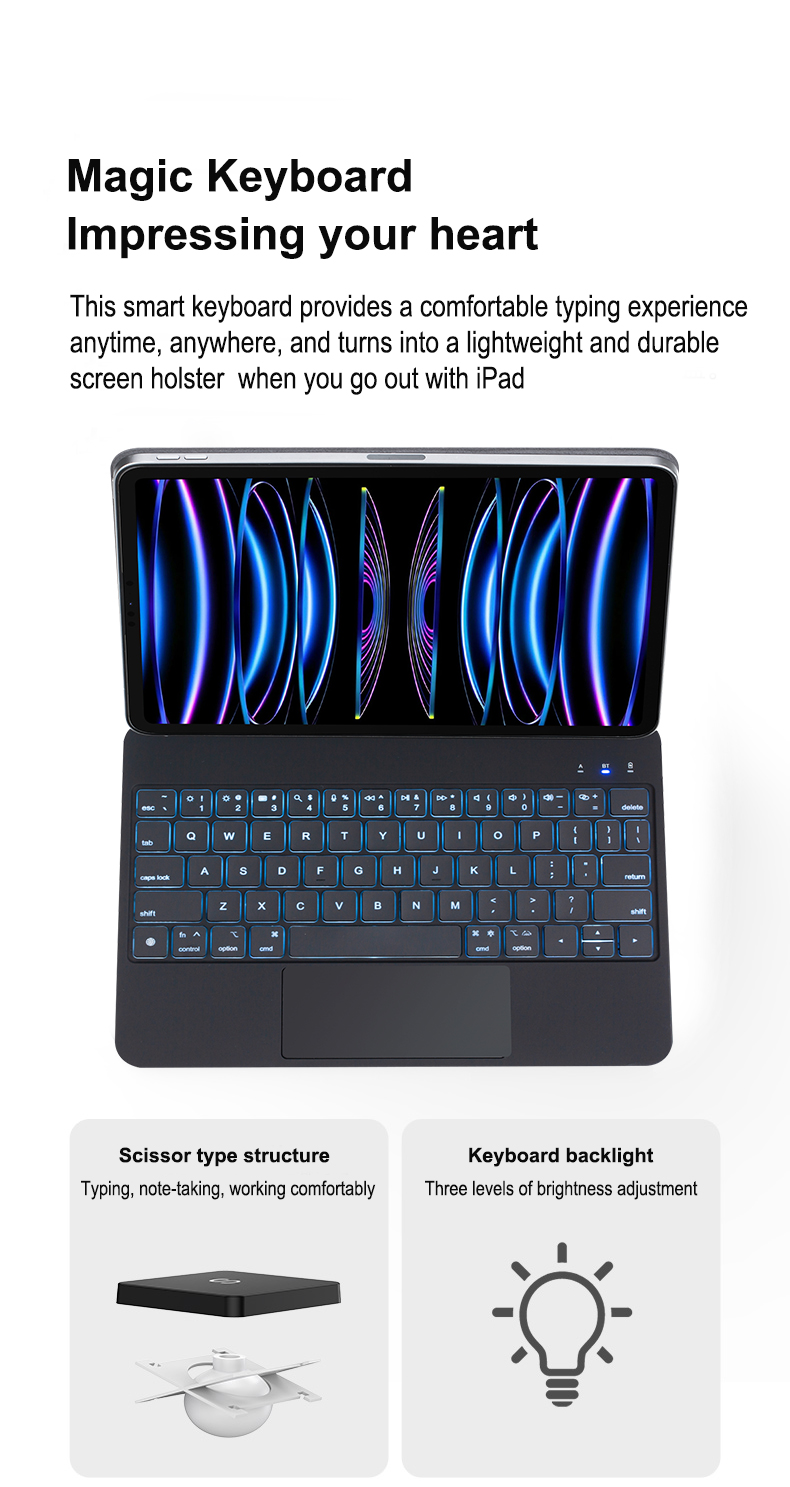
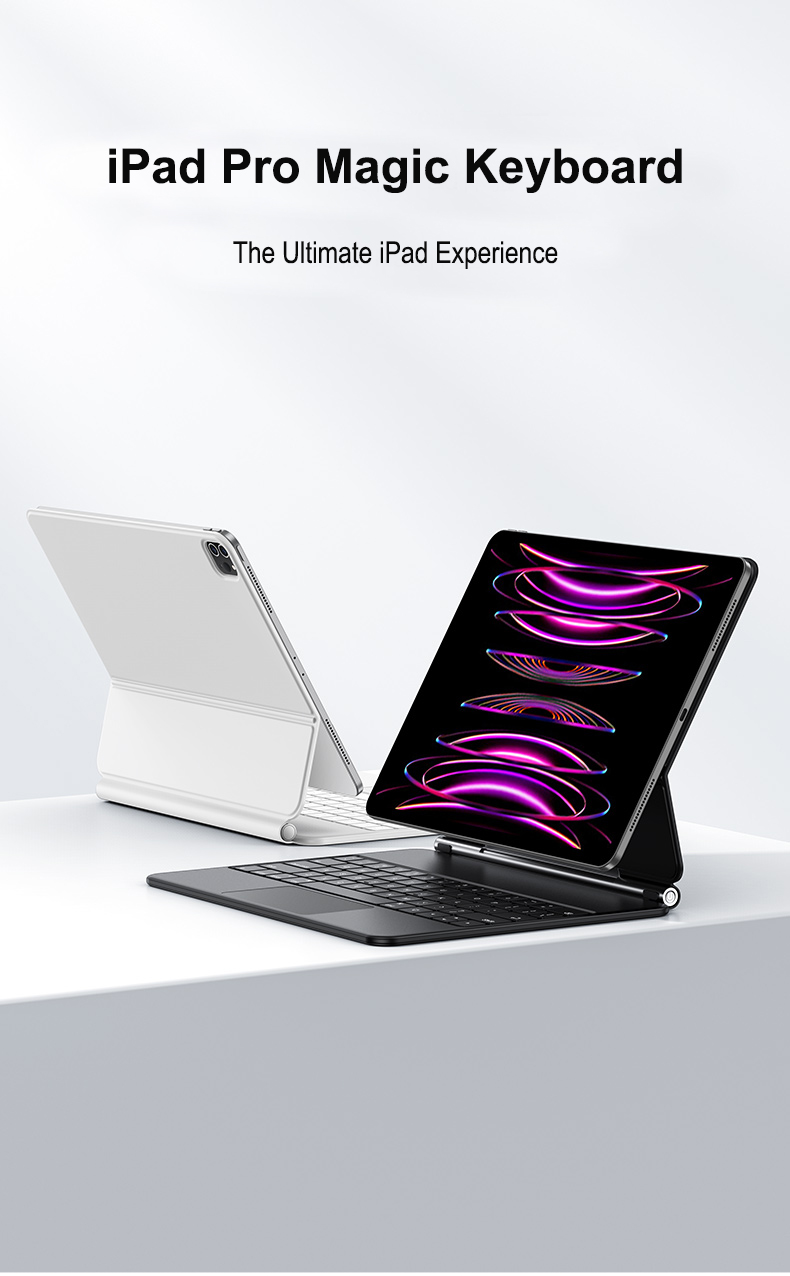
Avilágított Magic Keyboard ez egy olyan billentyűzet, amelynek alatt beépített világítás található, így a billentyűzetet könnyebb látni sötét vagy gyengén megvilágított környezetben. Az iPad-felhasználók számára egy világított billentyűzetes tok laptop-szerű gépelési élményt nyújthat, miközben megtartja az eszköz hordozhatóságát.
De mit is jelent pontosan a „világított” kifejezés, és mire figyeljen, amikor világított iPad-billentyűzetes tokot választ? Íme egy egyszerű útmutató.
Mi az a világított billentyűzet?
A világított billentyűzet kis LED-eket használ a billentyűk alatt vagy körül, hogy megvilágítsa a billentyűzetet. A fény segít a betűk és szimbólumok jobb láthatóságában, ha a környező tér sötét vagy félhomályos.
A világított billentyűzeteket gyakran alkalmazzák laptopokon, tabletekken és külső billentyűzeteken. Egyes modellek állítható fényerőt kínálnak, mások pedig különböző színű vagy effektusos világítást biztosíthatnak.
Az iPad-billentyűzetes tok világítása különösen hasznos éjszaka, utazás közben, illetve félhomályos irodában, osztályteremben vagy értekezleti teremben történő gépeléshez.
Hogyan működik egy háttérvilágítással ellátott Magic Keyboard?
Egy háttérvilágítással ellátott billentyűzet általában LED-eket használ a billentyűk szerkezete alatt. Amikor a háttérvilágítást bekapcsolják, a fény átjut a billentyűfelületeken vagy körülöttük, hogy megvilágítsa a karaktereket.
Egy tipikus háttérvilágítással ellátott billentyűzet tartalmazza:
LED-fényforrásokat
Megvilágított feliratokkal ellátott billentyűfelületeket
Fényvezetőt vagy diffúzort
Billentyűzet áramkörét
Világítás- és fényerő-szabályozó vezérlőt
A pontos tervezés termékenként változhat.
Vékony iPad billentyűzet tokok , a világítási rendszernek kompakt szerkezetbe kell illeszkednie, miközben jó billentyűláthatóságot, kényelmes gépelést és mérsékelt energiafogyasztást biztosít.
Milyen előnyöket nyújt a háttérvilágításos billentyűzet? Miért emelkedik ki a White Magic Keyboard
A háttérvilágításos billentyűzetek forradalmasítják az éjszakai gépelést, a játékosszességeket és az alacsony megvilágítású munkaterületeket. A White Magic Keyboard elegáns fehér világítással és gyakorlatias funkciókkal egyaránt rendelkezik, amelyek pontosabb gépelést, nagyobb kényelmet és vonzóbb megjelenést tesznek lehetővé. Az alábbiakban részletesen bemutatjuk a legfontosabb előnyöket, valamint azt, miért érdemes ezt a billentyűzetet választani azoknak a felhasználóknak, akik egyszerre keresik az esztétikát és a funkcionalitást.
1. Javított láthatóság és gépelési pontosság
A háttérvilágítás segítségével a billentyűfeliratok könnyebben láthatók sötét környezetben, csökkentve a gépelési hibákat és növelve a sebességet. A White Magic Keyboard éles fehér LED-jei egyértelműen kiemelik a betűket, anélkül hogy túlzottan erős fényt bocsátanának ki, így a tartalomra tudnak koncentrálni, nem pedig a billentyűk kimerítő keresgélésére.
2. Javított ergonómia és csökkentett szemfáradás
A megfelelően beállított háttérvilágítás segít csökkenteni a kontrasztterhelést egy fényes képernyő és egy sötét billentyűzet között. A White Magic Billentyűzet beállítható fényerősség-szinteket kínál, így a környező fényviszonyokhoz igazítható, és minimalizálható a szemfáradás hosszabb munkamenetek során.
3. Testreszabható világítás a termelékenység és a stílus érdekében
Számos háttérvilágítással ellátott billentyűzet többféle világítási módot kínál. A White Magic Billentyűzet tiszta, testreszabható fehér árnyalatokra összpontosít – választhat a lágy környezeti fénytől a magas kontrasztú megvilágításig. Ez a rugalmasság különböző feladatok támogatására szolgál, a koncentrált munkától az elmerülő játékélményig.
4. Jobb teljesítmény játékhoz és médiafelhasználáshoz
A játékosok gyorsabb billentyűfelismerésből profitálnak alacsony fényviszonyok mellett, valamint programozható háttérvilágítási funkciókból a billentyűk leképezésének láthatósága érdekében. A White Magic Billentyűzet reagáló kapcsolóival és egyenletes fehér háttérvilágításával biztosítja, hogy a kulcsfontosságú billentyűk láthatók maradjanak intenzív játék közben.
5. Esztétika és munkaterületi összhang
Egy fehér háttérvilágításos billentyűzet modern íróasztali kialakításokat emel ki, és jól illik a minimalista vagy professzionális környezetekhez. A White Magic Keyboard elegáns, prémium megjelenést nyújt, amely tökéletesen kiegészíti a laptopokat, monitorokat és egyéb fehér vagy ezüst színű perifériákat.
6. Energiahatékonyság és élettartam
A LED háttérvilágítás energiatakarékos és hosszú élettartamú. A White Magic Keyboard alacsony fogyasztású fehér LED-eket használ, hogy maximalizálja az akkumulátor élettartamát a vezeték nélküli modelleknél, és meghosszabbítsa az eszköz általános élettartamát gyakori cserék nélkül.
Mire figyeljen egy háttérvilágításos iPad-billentyűzet tok kiválasztásakor?
A megfelelő háttérvilágítással ellátott iPad billentyűzetes tok kiválasztása átalakíthatja táblagépedet egy termelékeny, hordozható munkaállomássá. Ha a fehér Magic Keyboard vagy más háttérvilágítással ellátott modell közül választasz, akkor a komfortérzetet, az összeférhetőséget, a világítás minőségét és a szerkezet tartósságát kell elsődlegesen figyelembe venned a legjobb gépelési élmény és érték eléréséhez.
1. Összeférhetőség és illeszkedés
Győződj meg róla, hogy a billentyűzetes tok kifejezetten a te iPad-modellnedre és méretére lett tervezve. A pontos illeszkedés megakadályozza a csatlakozók, a kamerák és az Apple Pencil tartó helytelen elhelyezését. Ha a fehér Magic Keyboard megjelenése vonzza a figyelmedet, ellenőrizd, hogy támogatja-e az iPad generációd – a mágneses rögzítés és a Smart Connector kompatibilitás kulcsfontosságú.
2. Háttérvilágítás minősége és vezérlése
A háttérvilágítás egyenletesnek és szabályozhatónak kell lennie. Keressen többszintű fényerő-beállításokat vagy automatikus környezeti fényérzékelőket a szemfáradás csökkentésére különböző megvilágítási körülmények között. A nagy minőségű LED-ek egyenletes megvilágítást biztosítanak a billentyűkön, így a white magic keyboard-stílusú háttérvilágítás nemcsak vonzó, hanem funkcionális is éjszakai gépeléshez.
3. Billentyűút, elrendezés és tapintati visszajelzés
A megfelelő billentyűút és a reagáló kapcsolók hosszabb gépelési munkamenetek során is kényelmesek. Ellenőrizze, hogy teljes méretű billentyűk, szabványos távolságok és dedikált iOS gyorsbillentyűk (kezdőlap, fényerő, médiavezérlők) találhatók-e. A white magic keyboard esztétikája gyakran scissor-switch mechanizmussal párosul, amely csendes működést és kielégítő tapintati visszajelzést egyaránt biztosít.
4. Szerkezeti anyagok és védelem
A tartós anyagok – például alumínium keretek vagy minőségi polikarbonát burkolatok – meghosszabbítják tokja élettartamát, és megvédik iPad-jét a behorpadásoktól és karcolódásoktól. Egy védő csukló, amely egyben állványként is szolgál, stabilitást biztosít, miközben megőrzi a vékony profilját. Ha tetszik a fehér Magic Keyboard minimalista, tiszta megjelenése, válasszon olyan anyagokat, amelyek ellenállnak a megzöldülésnek és foltok keletkezésének.
5. Akkumulátor-élettartam és kapcsolódási lehetőségek
A háttérvilágítással ellátott billentyűzetek több energiát fogyasztanak, ezért hosszú akkumulátor-élettartam vagy egyszerű töltés elengedhetetlen. Keressen olyan billentyűzeteket, amelyek újratölthető akkumulátorral rendelkeznek, és hetekig tartanak tipikus használat mellett, valamint USB-C vagy Lightning töltési lehetőséget kínálnak. Ha a billentyűzet Bluetooth-kapcsolatra épül, győződjön meg arról, hogy megbízhatóan párosítható, és alacsony késleltetésű teljesítményt nyújt, így a gépelés azonnalinak érződik.
6. Sokoldalúság és állványozási lehetőségek
Egy jó tok több nézési szöget kínál, és stabil állványt biztosít a gépeléshez, vázlatkészítéshez vagy videózásra. A mágneses beállíthatóság és a megbízható zárómechanizmusok javítják a használhatóságot. A fehér magic keyboard fogalma gyakran egy lebegő konzolos kialakítást is magában foglal – fontolja meg, hogy inkább rögzített vagy beállítható állványt részesít-e előnyben.
7. Hordozhatóság és súly
Egyensúlyozza a védelmet a hordozhatósággal. A könnyű kialakítások könnyebbé teszik az iPad hordozását, de ne áldozza fel érte az időtállóságot. Ha gyakran utazik, válasszon egy vékony, háttérvilágítással ellátott iPad billentyűzetest, amely alapvető védelmet nyújt anélkül, hogy túl sok térfogatot adna hozzá.
8. Ár, garancia és felhasználói értékelések
Hasonlítsa össze a funkciókat az árkategóriákkal, és olvassa el a felhasználói értékeléseket a valós idejű teljesítményről. Egy megbízható garancia és gyorsan reagáló ügyfélszolgálat a megbízható márkák jellemzője. Keressen összehasonlításokat, amelyek tartalmazzák a „white magic keyboard” kifejezést, ha ez a stílus fontos Önnek, és a hiteles értékeléseket részesítse előnyben a reklámcélú állításokkal szemben.
Összefoglalás
Amikor háttérvilágítással ellátott iPad billentyűzetes tokot választ, figyeljen a kompatibilitásra, a világítás minőségére, a billentyűk érzésére, az építőanyagokra, az akkumulátor élettartamára és a hordozhatóságra. Akár egy prémium fehér mágikus billentyűzetet ihlető dizájnt választ, akár egy költséghatékonyabb megoldást, a kényelem és megbízhatóság legyen a fő szempont a termelékenység és élvezet maximalizálása érdekében.
Gyors ellenőrzőlista
Modellkompatibilitás és Smart Connector-támogatás
Állítható, egyenletes háttérvilágítás
Kényelmes billentyűnyomás és iOS gyorsbillentyűk
Tartós anyagok és védő dizájn
Hosszú akkumulátor-élettartam vagy egyszerű töltés
Stabil, állítható állványzat-lehetőségek
Könnyű a hordozhatóság érdekében
Jó értékelések és garancia
A háttérvilágítással ellátott billentyűzet több akkumulátor-töltést használ?
Igen. A háttérvilágításhoz több energia szükséges, mint egy nem világító billentyűzet esetében.
Azonban a tényleges hatás függ olyan tényezőktől, mint a fényerő, az LED-k hatékonysága, a használati idő és az akkumulátor kapacitása.
Egy vezeték nélküli billentyűzettok esetében a gyártóknak egyensúlyt kell teremteniük a háttérvilágítás teljesítménye, az akkumulátor-élettartam, a tok vastagsága és a termék általános terve között .
Megéri-e a háttérvilágított billentyűzet?
A háttérvilágított billentyűzet hasznos funkció lehet, ha gyakran gépelnek alacsony megvilágítású környezetben.
Különösen releváns azok számára, akik az iPad-et a következő célokra használják:
Üzleti munka
Tanulás
Utazás
Távoli munka
Írás és tartalomkészítés
Ha főként nappal, világos környezetben használja az iPad-et, a háttérvilágítás kevésbé fontos lehet. A billentyűzet érzete, a kompatibilitás, a védelem, az akkumulátor-élettartam és az érintőpados teljesítmény nagyobb hatással lehet az általános felhasználói élményre.
Gyakran Ismételt Kérdések a Háttérvilágítással Ellátott Magic Billentyűzetekről
Mi az a háttérvilágítással ellátott Magic Billentyűzet?
A háttérvilágítással ellátott Magic Billentyűzet egy olyan billentyűzet, amelynek kulcsai alatt integrált világítás található. A megvilágítás segíti a kulcsok észrevételét sötét vagy gyengén megvilágított környezetben.
Mit jelent a „háttérvilágítás” egy billentyűzeten?
a „háttérvilágítás” azt jelenti, hogy a billentyűzeten a kulcsok mögött vagy alatt fényforrás található. A kulcsfeliratok megvilágítására általában LED-eket használnak.
Csökkenti-e a háttérvilágításos billentyűzet az akkumulátor töltöttségét?
Igen, a háttérvilágítás használata további energiát igényel. A tényleges akkumulátorhatás függ a világítás intenzitásától, az LED-k hatékonyságától, az akkumulátor kapacitásától és a háttérvilágítás használatának időtartamától.
Lehet-e háttérvilágítással ellátott billentyűzettok a tablet számára (iPad)?
Igen. Számos iPad-kompatibilis billentyűzettok érhető el háttérvilágítással ellátott kulcsokkal. A terméktől függően változó fényerő-beállítás vagy többféle világítási szín is elérhető lehet.
Testre szabható-e egy háttérvilágítással ellátott billentyűzettok?
Az OEM- és ODM-projektekhez a gyártók esetleg testre szabhatják a funkciókat, például a billentyűzet nyelvét, a billentyűk elrendezését, a háttérvilágítás színét, a fényerő-szinteket, az anyagokat, a logót, a csomagolást és egyéb specifikációkat.
Összefoglalás
Avilágított Magic Keyboard integrált megvilágítást ad a billentyűzethez, így könnyebb gépelni alacsony megvilágítású környezetben, és laptop-szerűbb élményt nyújt.
Egy iPad billentyűzettel ellátott tok , azonban a háttérvilágítás csak egy része a terméknek. A kompatibilitás, a gépelési érzés, az akkumulátor-teljesítmény, a védelem, az anyagok és az általános tervezés ugyanolyan fontosak.
Márkák és forgalmazók számára, akik testre szabott háttérvilágítással ellátott billentyűzettokot keresnek, egy tapasztalt OEM/ODM-gyártó segíthet a termék fejlesztésében a tervezéstől és prototípus-készítéstől a tesztelésen és tömeggyártáson át.

 EN
EN