IPad için Arka Aydınlatmalı Beyaz Magic Klavye: Uzun Süreli Bir İnceleme
Time : 2026-09-17
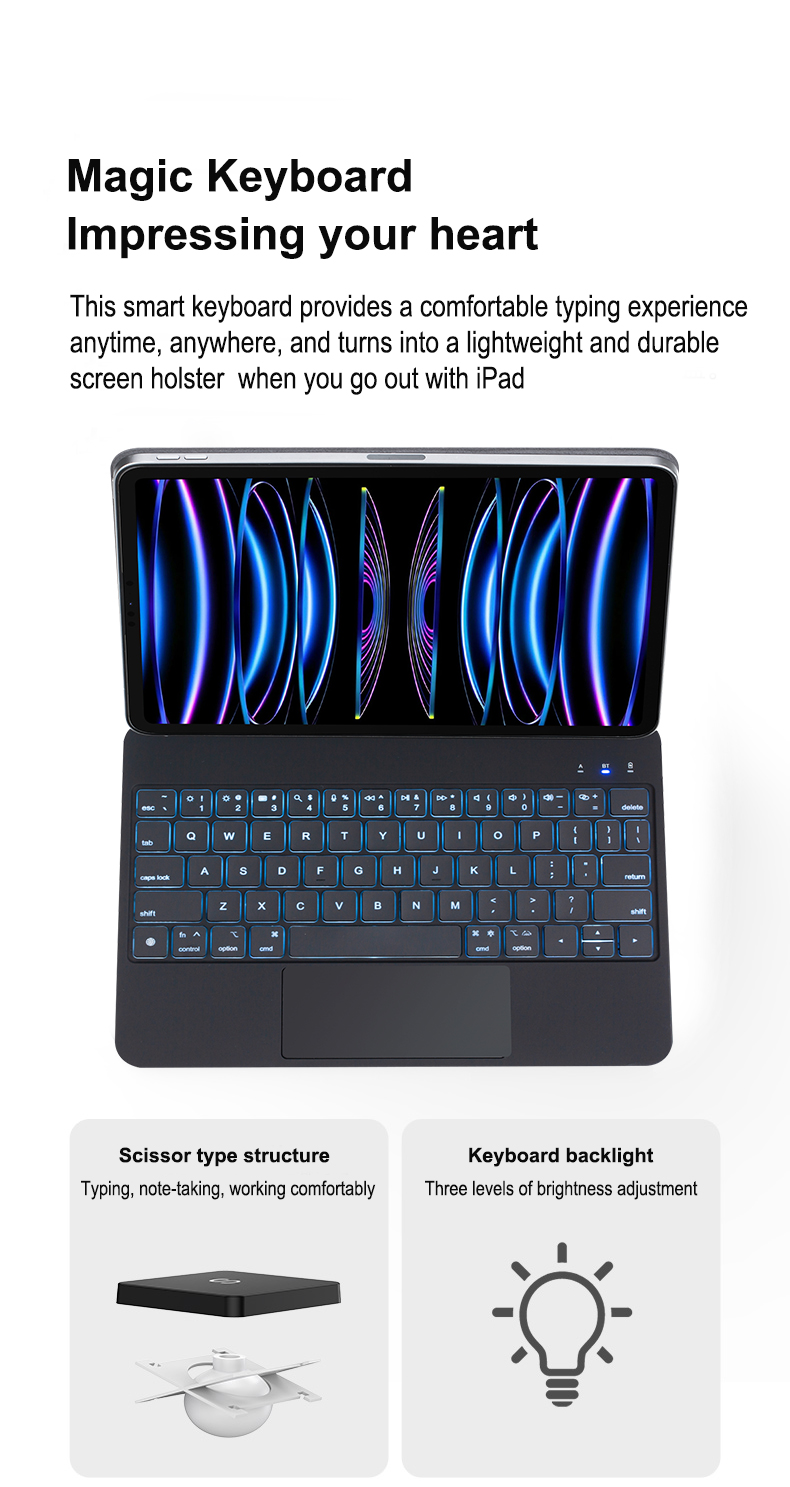
K arka aydınlatmalı Magic Keyboard tuşların altına entegre edilmiş aydınlatmaya sahip bir klavyedir ve düşük ışık koşullarında klavyenin görülmesini kolaylaştırır. iPad kullanıcıları için arka aydınlatmalı bir klavye kılıfı, cihazın taşınabilirliğini korurken daha dizüstü bilgisayar benzeri bir yazma deneyimi sağlayabilir.
Ancak "arka aydınlatmalı" ifadesi tam olarak ne anlama gelir ve arka aydınlatmalı bir iPad klavye kılıfı seçerken nelere dikkat etmelisiniz? İşte basit bir rehber.
Arka Aydınlatmalı Klavye Nedir?
Arka aydınlatmalı bir klavye, tuşların altına veya çevresine yerleştirilmiş küçük LED ışıkları kullanarak klavyeyi aydınlatır. Işık, ortamın karanlık veya loş olduğu durumlarda harfleri ve sembolleri görmeyi kolaylaştırır.
Arka aydınlatmalı klavyeler genellikle dizüstü bilgisayarlar, tabletler ve harici klavyelerde kullanılır. Bazı modeller ayarlanabilir parlaklık seviyesi sunarken diğerleri farklı renklerde aydınlatma veya özel efektler sunabilir.
Bir iPad klavye kılıfı için arka aydınlatma, özellikle gece çalışırken, seyahat ederken ya da loş bir ofis, sınıf veya toplantı odasında yazarken oldukça faydalı olabilir.
Arka aydınlatmalı Magic Klavye Nasıl Çalışır?
Arka aydınlatmalı bir klavye genellikle tuş yapısının altına yerleştirilmiş LED’ler kullanır. Arka aydınlatma açıldığında ışık, karakterleri aydınlatmak için tuş kapaklarından geçer veya etrafından dolaşır.
Tipik bir arka aydınlatmalı klavye şunları içerir:
LED ışık kaynakları
Aydınlatılmış işaretlemelere sahip tuş kapakları
Işık kılavuzu veya dağıtıcı
Klavye devreleri
Aydınlatma ve parlaklık için bir denetleyici
Tam tasarım ürünler arasında değişiklik gösterir.
İnce iPad klavye kılıfları , aydınlatma sistemi, iyi anahtar görünürlüğünü, rahat yazmayı ve makul bir güç tüketimini korurken, kompakt bir yapıya sığmalıdır.
Arka aydınlatmalı klavyenin avantajları nelerdir? Neden White Magic Klavye öne çıkar?
Arka aydınlatmalı klavyeler, gece yazımını, oyun seanslarını ve az ışıklı çalışma alanlarını dönüştürür. White Magic Klavye açık beyaz aydınlatmayı zarif bir şekilde birleştirir ve doğruluk, konfor ve estetiği artırmak için tasarlanmış pratik özelliklerle donatılmıştır. Aşağıda en önemli avantajları ve bu klavyenin hem biçim hem de işlev açısından dengeli bir seçim olmasını sağlayan özellikleri açıklıyoruz.
1. Geliştirilmiş Görünürlük ve Yazım Doğruluğu
Arka aydınlatma, loş ortamlarda tuş etiketlerinin daha kolay görülmesini sağlar; bu da yazım hatalarını azaltır ve hızı artırır. White Magic Klavye’nin net beyaz LED’leri harfleri açıkça vurgular ancak aşırı parlaklık yaratmaz, böylece tuşlara kıskaç yapmadan içeriğe odaklanabilirsiniz.
2. Geliştirilmiş Ergonomi ve Azaltılmış Göz Yorgunluğu
Uygun şekilde ayarlanmış arka aydınlatma, parlak bir ekran ile karanlık bir klavye arasındaki kontrast gerginliğini azaltmaya yardımcı olur. White Magic Klavye, ortam ışığına uyum sağlamak ve uzun süreli oturumlarda göz yorgunluğunu en aza indirmek için ayarlanabilir parlaklık seviyeleri sunar.
3. Verimlilik ve Şıklık İçin Özelleştirilebilir Aydınlatma
Birçok arka aydınlatmalı klavye, çoklu aydınlatma modları sunar. White Magic Klavye ise temiz ve özelleştirilebilir beyaz tonlara odaklanır — yumuşak ortam parlamasından yüksek kontrastlı aydınlatmaya kadar seçim yapabilirsiniz. Bu esneklik, odaklı çalışma gibi farklı görevleri veya büyüleyici bir oyun deneyimi gibi durumları destekler.
4. Oyun ve Medya İçin Daha İyi Performans
Oyuncular, düşük ışık koşullarında daha hızlı tuş tanıma ve tuş eşleme görünürlüğü için programlanabilir arka aydınlatma işlevlerinden faydalanır. White Magic Klavye’nin duyarlı anahtarları ve tutarlı beyaz arka aydınlatması, yoğun oyun anlarında kritik tuşların her zaman görünür kalmasını sağlar.
5. Estetik ve Çalışma Alanı Uyumluğu
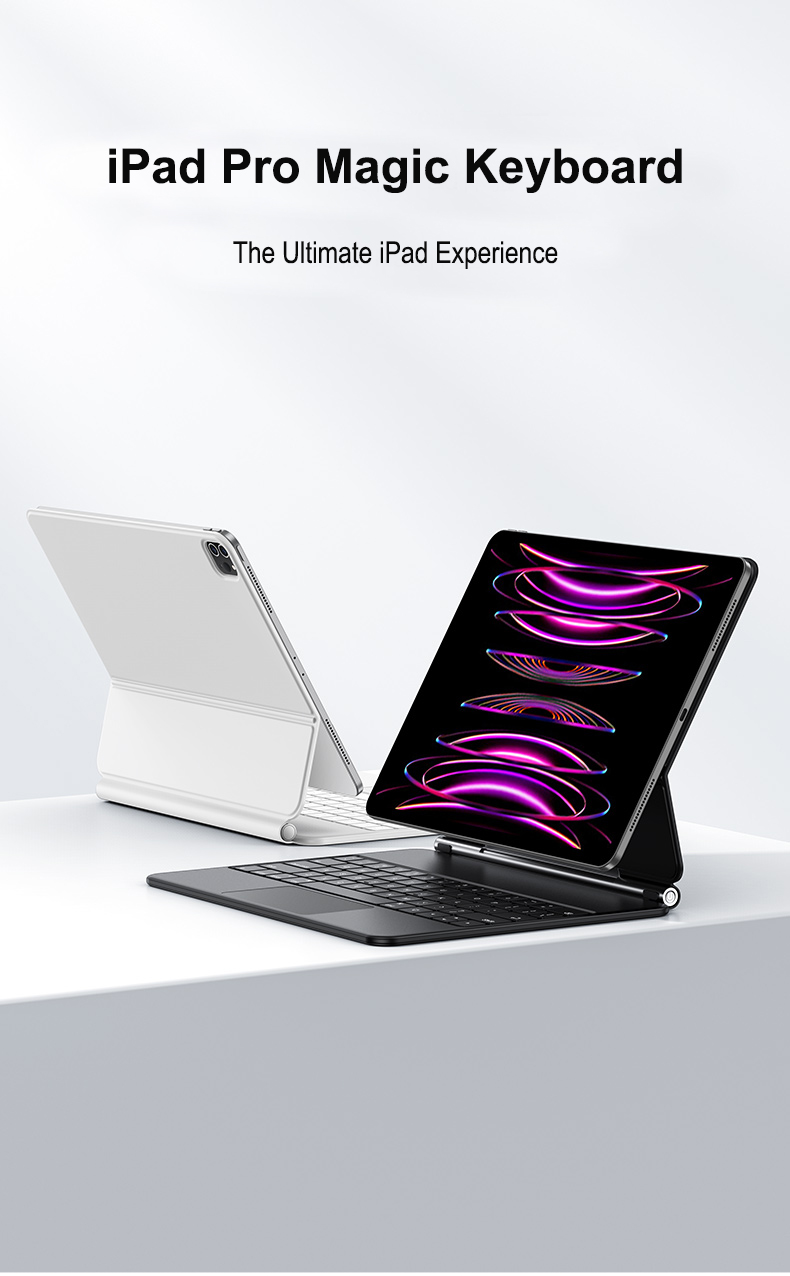
Beyaz arka aydınlatmalı bir klavye, modern masa düzenlerini geliştirir ve minimal ya da profesyonel ortamlarla uyumlu çalışır. Beyaz Magic Klavye, dizüstü bilgisayarlar, monitörler ve diğer beyaz ya da gümüş renkli çevre birimleriyle uyumlu, şık ve üst düzey bir görünüm sunar.
6. Enerji Verimliliği ve Uzun Ömür
LED arka aydınlatmalar enerji verimlidir ve uzun ömürlüdür. Beyaz Magic Klavye, kablosuz modellerde pil ömrünü maksimize etmek ve cihazın genel kullanım ömrünü sık sık değiştirme gereksinimi olmadan uzatmak için düşük güç tüketimli beyaz LED’ler kullanır.
Arka aydınlatmalı bir iPad klavye kılıfı seçerken nelere dikkat etmelisiniz?
Doğru arka aydınlatmalı iPad klavye kılıfını seçmek, tabletinizi üretken ve taşınabilir bir iş istasyonuna dönüştürebilir. Beyaz Magic Keyboard veya diğer arka aydınlatmalı tasarımlar gibi seçenekleri değerlendiriyorsanız, en iyi yazma deneyimi ve değer elde etmek için konforu, uyumluluğu, aydınlatma kalitesini ve yapının dayanıklılığını önceliklendirin.
1. Uyumluluk ve Oturma Kalitesi
Klavye kılıfının, iPad modeliniz ve boyutunuz için açıkça tasarlandığından emin olun. Sıkı bir oturma kalitesi, bağlantı noktalarının, kameraların ve Apple Pencil tutucunun hizalanmamasını önler. Beyaz Magic Keyboard görünümünü tercih ediyorsanız, bu ürünün iPad neslinizi desteklediğini doğrulayın—manyetik bağlantılar ve Smart Connector uyumluluğu kritik öneme sahiptir.
2. Arka Aydınlatma Kalitesi ve Kontroller
Arka aydınlatma eşit olmalı ve ayarlanabilir olmalıdır. Göz yorgunluğunu farklı ışık koşullarında azaltmak için çok seviyeli parlaklık ayarları veya otomatik ortam sensörleri arayın. Yüksek kaliteli LED’ler, tuşlar boyunca tutarlı aydınlatma sağlar; bu da beyaz Magic Keyboard tarzı arka aydınlatmayı, geç saatlerde yazım yapmak için hem çekici hem de işlevsel kılar.
3. Tuş Hareketi, Düzen ve Dokunsal Geri Bildirim
İyi tuş hareketi ve duyarlı anahtarlar, uzun süreli yazım oturumlarını rahat hale getirir. Tam boyutlu tuşlar, standart aralıklar ve özel iOS kısayol tuşları (ana sayfa, parlaklık, medya denetimleri) olup olmadığını kontrol edin. Beyaz Magic Keyboard estetiği genellikle sessiz çalışma ile tatmin edici dokunsal geri bildirimi dengede tutan makas mekanizmalarıyla birlikte kullanılır.
4. Üretim Malzemeleri ve Koruma
Dayanıklı malzemeler—alüminyum çerçeveler veya yüksek kaliteli polikarbonat kabuklar—kılıfınızın ömrünü uzatır ve iPad’inizi çarpmalara ve çizilmelere karşı korur. Bir koruyucu menteşe, aynı zamanda bir ayak olarak işlev görür ve ince bir profili korurken kararlılık sağlar. Beyaz bir Magic Keyboard’ın minimal, temiz görünümünü seviyorsanız, sararma ve leke oluşumuna dirençli malzemeler seçin.
5. Pil Ömrü ve Bağlantı
Arka aydınlatmalı klavyeler daha fazla güç tüketir; bu nedenle uzun pil ömrü veya kolay şarj edilebilirlik kritik öneme sahiptir. Tipik kullanımda haftalarca dayanan şarj edilebilir pilli ve USB-C veya Lightning ile şarj edilebilen klavyeleri tercih edin. Klavye Bluetooth kullanıyorsa, güvenilir eşleştirme ve düşük gecikmeli performans sağladığından emin olun; böylece yazma hissi anında olur.
6. Çok Yönlülük ve Ayak Seçenekleri
İyi bir kılıf, yazma, çizim yapma veya video izleme için çoklu görüntüleme açıları ve kararlı bir ayak sunar. Manyetik ayarlanabilirlik ve güvenilir kilitleme mekanizmaları kullanışlılığı artırır. Beyaz sihirli klavye kavramı genellikle yüzen konsol tasarımı içerir—sabit mi yoksa ayarlanabilir mi bir ayak tercih ettiğinizi değerlendirin.
7. Taşınabilirlik ve Ağırlık
Koruma ile taşınabilirliği dengeleyin. Hafif tasarımlar iPad’inizi taşımayı kolaylaştırır, ancak dayanıklılıktan ödün vermeden. Sık sık seyahat ediyorsanız, temel korumayı sağlayıp fazladan hacim eklemeden ince, arka aydınlatmalı bir iPad klavye kılıfı seçin.
8. Fiyat, Garanti ve İncelemeler
Özellikleri fiyatlarla karşılaştırın ve gerçek dünya performansı için kullanıcı incelemelerini okuyun. Güvenilir bir garanti ve hızlı müşteri desteği, saygın bir markanın göstergesidir. Bu tarz sizin için önemliyse, "beyaz sihirli klavye" terimini içeren karşılaştırmaları araştırın ve tanıtım iddialarının aksine doğrulanmış incelemelere öncelik verin.
Sonuç
Arka aydınlatmalı iPad klavye kılıfı seçerken uyumluluk, aydınlatma kalitesi, tuş dokusu, yapı malzemeleri, pil ömrü ve taşınabilirlik odak noktaları olmalıdır. Üst düzey beyaz sihirli klavye ilhamlı bir tasarım mı yoksa daha bütçe dostu bir seçenek mi tercih ederseniz, üretkenliği ve keyfi en üst düzeye çıkarmak için konforu ve güvenilirliği önceliklendirin.
Hızlı kontrol listesi
Model uyumluluğu ve Smart Connector desteği
Ayarlabilir, eşit arka aydınlatma
Rahat tuş hareket mesafesi ve iOS kısayolları
Dayanıklı malzemeler ve koruyucu tasarım
Uzun pil ömrü veya kolay şarj imkânı
Sabit, ayarlabilir ayak seçenekleri
Taşınabilirlik için hafif ağırlık
Olumlu incelemeler ve garanti
Arka aydınlatmalı bir klavye daha fazla pil tüketir mi?
Evet. Arkayansıma, aydınlatmasız bir klavyeye kıyasla ek güç gerektirir.
Ancak gerçek etki, parlaklık, LED verimliliği, kullanım süresi ve pil kapasitesi gibi faktörlere bağlıdır.
Kablosuz bir klavye kılıfı için üreticilerin dengede tutması gerekir arkayansıma performansı, pil ömrü, kalınlık ve genel ürün tasarımı .
Arkayansımlı bir klavye değer mi?
Arkayansımlı bir klavye, sık sık düşük ışık ortamlarında yazıyorsanız yararlı bir özellik olabilir.
Bu özellikle iPad’i şu amaçlarla kullanan kullanıcılar için önemlidir:
İş çalışmaları
Çalışmak
Seyahat
Uzaktan Çalışma
Yazım ve içerik oluşturma
IPad’inizi çoğunlukla gündüzleri parlak ortamlarda kullanıyorsanız arkayansıma özelliği daha az önemli olabilir. Klavye dokusu, uyumluluk, koruma, pil ömrü ve trackpad performansı genel deneyiminiz üzerinde daha büyük bir etkiye sahip olabilir.
Arka aydınlatmalı Sihirli Klavyeler Hakkında SSS
Arka aydınlatmalı Sihirli Klavye nedir?
Arka aydınlatmalı Sihirli Klavye, tuşların altına entegre edilmiş aydınlatmaya sahip bir klavyedir. Aydınlatma, karanlık veya az ışıklı ortamlarda tuşları görmeyi kolaylaştırır.
Klavyede "arka aydınlatmalı" ne anlama gelir?
"Arka aydınlatmalı", klavyenin tuşlarının arkasında veya altında bir ışık kaynağına sahip olduğunu ifade eder. Tuş karakterlerini aydınlatmak için genellikle LED’ler kullanılır.
Arka aydınlatmalı klavye pil ömrünü tüketir mi?
Evet, arka aydınlatmayı kullanmak ekstra güç tüketir. Gerçek pil etkisi, parlaklık seviyesine, LED verimliliğine, pil kapasitesine ve arka aydınlatmanın ne kadar süreyle kullanıldığına bağlıdır.
Bir iPad klavye kılıfı arka aydınlatmaya sahip olabilir mi?
Evet. Birçok iPad klavye kılıfı arka aydınlatmalı tuşlarla mevcuttur. Ürünün özelliğine göre ayarlanabilir parlaklık veya birden fazla aydınlatma rengi sunulabilir.
Arka aydınlatmalı bir klavye kılıfı özelleştirilebilir mi?
OEM ve ODM projeleri için üreticiler, klavye dilini, tuş düzenini, arka aydınlatma rengini, parlaklık seviyelerini, malzemeleri, logoyu, ambalajı ve diğer teknik özellikleri özelleştirebilir.
Sonuç
K arka aydınlatmalı Magic Keyboard klavyeye entegre aydınlatma özelliği ekler; bu da düşük ışık koşullarında yazmayı kolaylaştırır ve daha çok dizüstü bilgisayar benzeri bir deneyim yaratır.
Bir ipad klavye kılıfı , ancak arka aydınlatma ürünün yalnızca bir parçasıdır. Uyumluluk, yazma hissi, pil performansı, koruma, malzemeler ve genel tasarım da eşit derecede önemlidir.
Özelleştirilmiş bir arka aydınlatmalı klavye kılıfı aranan markalar ve dağıtım şirketleri için tecrübeli bir OEM/ODM üretici, ürünü tasarımdan prototipleme aşamasına, testlere ve seri üretime kadar geliştirmelerine yardımcı olabilir.

 EN
EN